
This tutorial of Robo India explains the building of smart rooftop garden using moisture sensor .
1. Introduction:
It is a NodeMCU based automatic plant watering system that uses a soil moisture sensor.
2. Required Hardware
Following Hardware will be required :
| S.No. | Item | Quantity |
| 1 | NodeMCU | 1 |
| 2 | Breadboard | 1 |
| 3 | Soil Moisture Sensor | 1 |
| 4 | Solenoid valve | 1 |
| 5 | Relay | 1 |
| 6 | Step Down Transformer | 1 |
| 7 | NPN Transistor | 1 |
3. Building Circuit
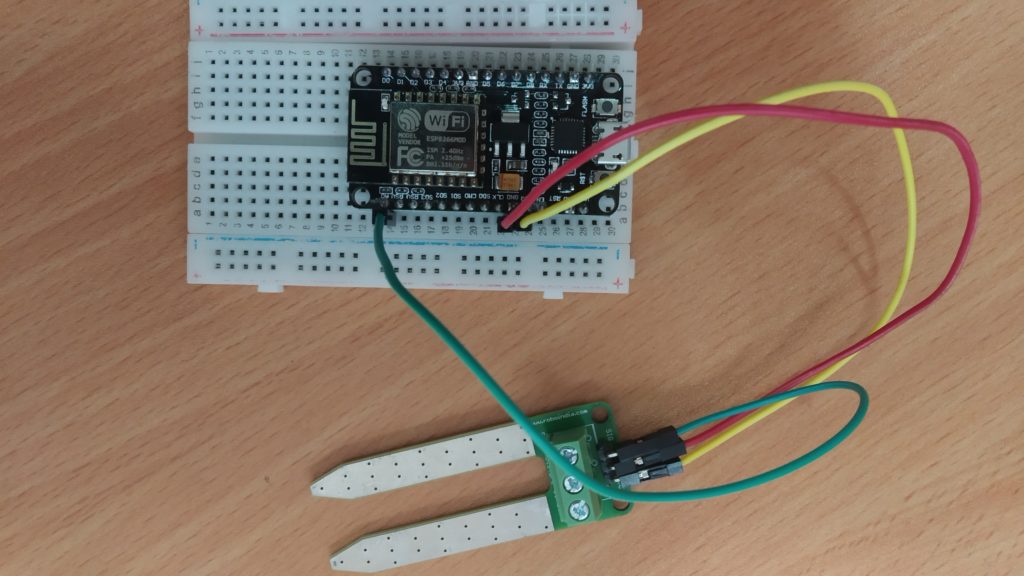
Make the following connections –
(1) Connections with Soil Moisture
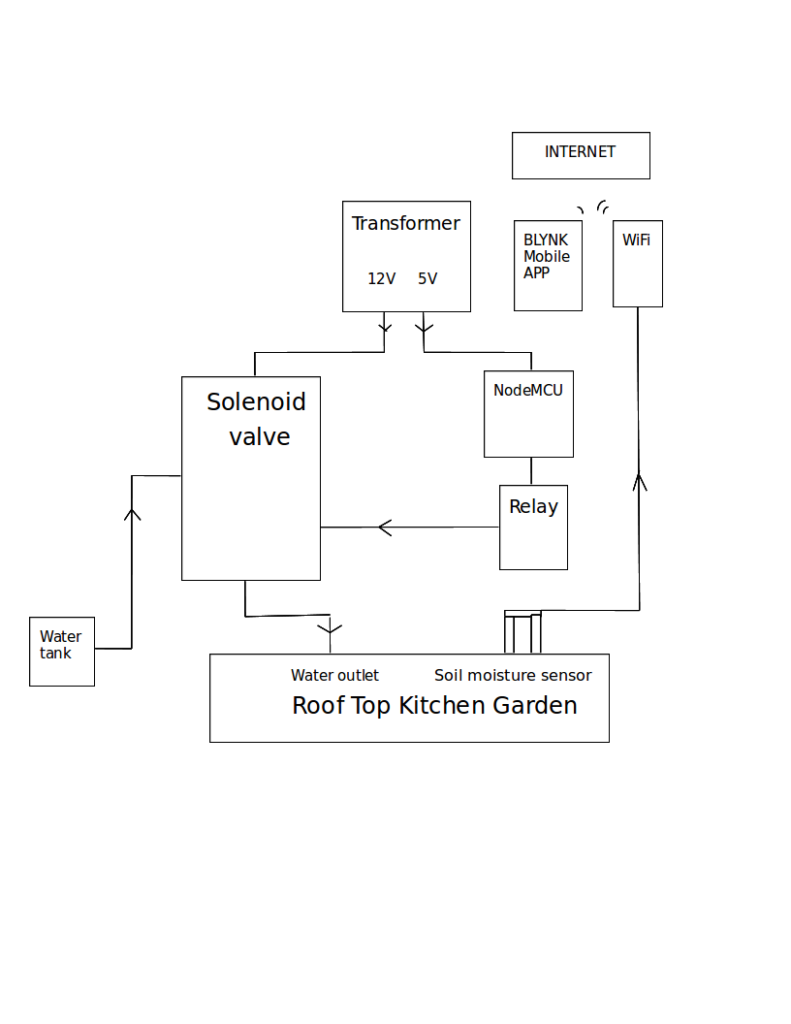
(2) Block Diagram of whole circuit-
For Blynk Setup :
(1)Open App and create a new Project
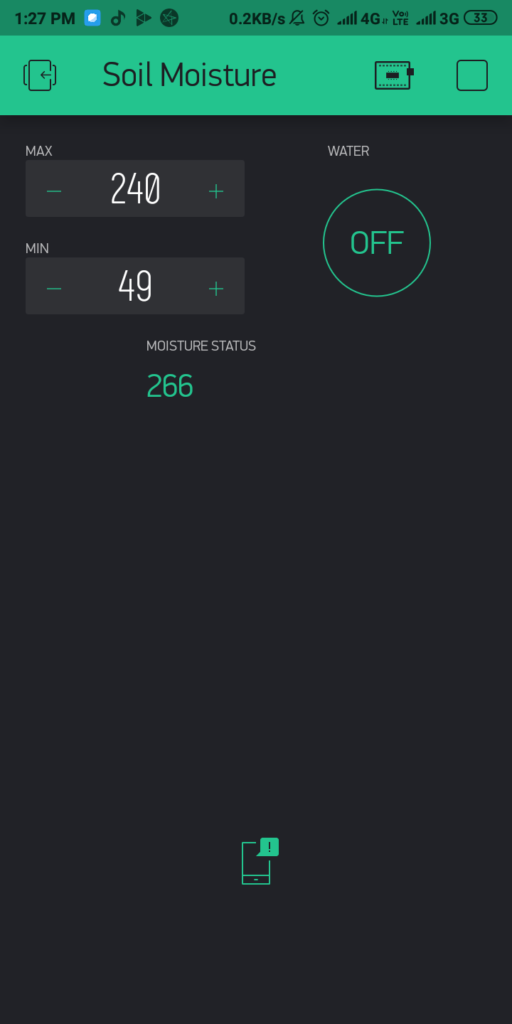
(2)Add Five widgets 2-Numeric Input, Labeled Value, Button,Notification
(3)Add Maximum and Minimum in Numeric Input widgets.
4. Programming
You may download this NodeMCU Sketch from here.
#define BLYNK_PRINT Serial
#include <ESP8266WiFi.h>
#include <BlynkSimpleEsp8266.h>
#include <WiFiClient.h>
#include <ThingSpeak.h>
String apiKey = "....";  //apiKey from Thingspeak
BlynkTimer timer;
char auth[] = "....";  //auth token from blynk app

int minData=550;
int  maxData=40;
int LEDV= 0;
int sensorState ;
const char* server = "api.thingspeak.com";
WiFiClient client;
BLYNK_WRITE(V1) //Button Widget is writing to pin V1
{
   minData = param.asInt();
}
BLYNK_WRITE(V2) //Button Widget is writing to pin V1
{
   maxData = param.asInt();
}
BLYNK_WRITE(V5) //Button Widget is writing to pin V1
{
   LEDV = param.asInt();
   if(LEDV ==0)
      digitalWrite(4,LOW);
   else
       digitalWrite(4,HIGH);

}
 BLYNK_READ(V4)
     {
            Blynk.virtualWrite(V4,sensorState);
      }
void sendSensor()
{
   sensorState = analogRead(A0);
   Serial.println(sensorState);


      if (sensorState < minData)
        { if(LEDV!=HIGH)
           { Serial.println("needs water, send notification");
           //Blynk.notify("Water your plants");
             BLYNK_READ(V4);
           }

        }
 else if  (sensorState >= maxData&&LEDV==HIGH )
         {
           Serial.println("does not need water");
           digitalWrite(4,LOW);
           Blynk.notify(" pump  switched off");
           Blynk.virtualWrite(V5,LOW);
           LEDV=0;
          }
 else
     {
      Serial.println("all Good");
     }

  if (client.connect(server,80))   //   "184.106.153.149" or api.thingspeak.com
                      {

                             String postStr = apiKey;

                             postStr +="&field3=";
                             postStr += String(sensorState);
                             postStr += "\r\n\r\n";

                             client.print("POST /update HTTP/1.1\n");
                             client.print("Host: api.thingspeak.com\n");
                             client.print("Connection: close\n");
                             client.print("X-THINGSPEAKAPIKEY: "+apiKey+"\n");
                             client.print("Content-Type: application/x-www-form-urlencoded\n");
                             client.print("Content-Length: ");
                             client.print(postStr.length());
                             client.print("\n\n");
                             client.print(postStr);


                             Serial.print("  Moisture ");
                             Serial.print(sensorState);
                             Serial.print("\n\n");


                        }
          client.stop();

}

void setup()
{
  Serial.begin(9600);
  Blynk.begin(auth, "....", "....");  //wifi name and password
  pinMode(4, OUTPUT);
  timer.setInterval(2000L,sendSensor);
}

void loop()
{
  Blynk.run();
  timer.run();

}
6. Output:
If you have any query please write us at support@roboindia.com
Thanks and Regards
Content Development Team
Robo India
https://roboindia.com